The actual goal
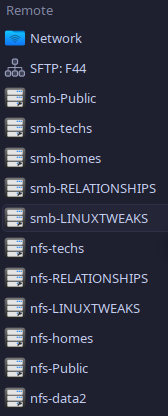
I wanted my QNAP and T620 shares to show up as normal folders in Dolphin on every machine I use, not something I connect to manually every session. Real mountpoints, mounted at boot, showing up as actual directories. Two different systems here, so two genuinely different setups … Fedora with a plain fstab, NixOS with a declarative config.
Fedora side (JackSparrow2 itself) … the full block
Step 1 … every mountpoint directory, created up front:
sudo mkdir -p \
    /mnt/nfs-data2 \
    /mnt/nfs-LINUXTWEAKS \
    /mnt/nfs-Public \
    /mnt/nfs-RELATIONSHIPS \
    /mnt/nfs-homes \
    /mnt/nfs-techs \
    /mnt/smb-LINUXTWEAKS \
    /mnt/smb-Public \
    /mnt/smb-RELATIONSHIPS \
    /mnt/smb-homes \
    /mnt/smb-techs
I mount both NFS and SMB versions side by side … genuinely useful for testing which protocol actually behaves better for a given workload, rather than committing to one blind.
Step 2 … back up fstab before touching it, every time, no exceptions:
sudo cp /etc/fstab /etc/fstab.bak.$(date +%Y%m%d-%H%M%S)
Cost nothing, saved me more than once.
Step 3 … a real credentials file for the SMB mounts, so the password isn’t sitting in plain fstab where anyone reading it can see it:
sudo mkdir -p /etc/samba/creds
sudo tee /etc/samba/creds/jacksparrow2 > /dev/null << 'EOF'
username=tolga
password=your-actual-samba-password
EOF

sudo chmod 600 /etc/samba/creds/jacksparrow2
sudo chown root:root /etc/samba/creds/jacksparrow2
600 and root:root matter here … this file has a real password in
it, no reason for it to be readable by anyone else on the box.
Step 4 … the actual fstab block, both protocols, every share:
sudo tee -a /etc/fstab > /dev/null << 'EOF'
# -- MOUNTS ----
192.168.0.xxx:/mnt/data2        /mnt/nfs-data2          nfs    soft,timeo=30,retrans=2,noatime   0 0
192.168.0.xxx:/LINUXTWEAKS      /mnt/nfs-LINUXTWEAKS    nfs    vers=3,soft,timeo=30,retrans=2,noatime   0 0
192.168.0.xxx:/Public           /mnt/nfs-Public         nfs    vers=3,soft,timeo=30,retrans=2,noatime   0 0
192.168.0.xxx:/RELATIONSHIPS    /mnt/nfs-RELATIONSHIPS   nfs    vers=3,soft,timeo=30,retrans=2,noatime   0 0
192.168.0.xxx:/homes            /mnt/nfs-homes          nfs    vers=3,soft,timeo=30,retrans=2,noatime   0 0
192.168.0.xxx:/techs            /mnt/nfs-techs          nfs    vers=3,soft,timeo=30,retrans=2,noatime   0 0
//192.168.0.xxx/LINUXTWEAKS     /mnt/smb-LINUXTWEAKS    cifs   credentials=/etc/samba/creds/jacksparrow2,uid=1000,gid=1000,noatime,_netdev   0 0
//192.168.0.xxx/Public          /mnt/smb-Public         cifs   credentials=/etc/samba/creds/jacksparrow2,uid=1000,gid=1000,noatime,_netdev   0 0
//192.168.0.xxx/RELATIONSHIPS   /mnt/smb-RELATIONSHIPS   cifs   credentials=/etc/samba/creds/jacksparrow2,uid=1000,gid=1000,noatime,_netdev   0 0
//192.168.0.xxx/homes           /mnt/smb-homes          cifs   credentials=/etc/samba/creds/jacksparrow2,uid=1000,gid=1000,noatime,_netdev   0 0
//192.168.0.xxx/techs           /mnt/smb-techs          cifs   credentials=/etc/samba/creds/jacksparrow2,uid=1000,gid=1000,noatime,_netdev   0 0
EOF
soft,timeo=30,retrans=2 on every NFS line … the box that taught me
why: a hard mount that stalls during boot can hang the entire startup
sequence in a state you can’t even kill. _netdev on the CIFS lines so
systemd knows to wait for networking before attempting them.
Step 5 … apply and test:
sudo systemctl daemon-reload
sudo mount -a
Step 6 … actually verify, both protocols:
mount | grep -E 'nfs-|smb-'
df -h | grep -E 'nfs-|smb-'
df -h alongside mount gives me real used/available space per share,
not just a yes/no on whether it’s attached … a mount can show as active
while genuinely broken, df reporting real numbers is a better signal
that it’s actually working.
NixOS side (my desktop) … the config, not a plain fstab
NixOS doesn’t have a hand-edited /etc/fstab … fileSystems entries
in configuration.nix (or an imported module) get compiled into real
systemd mount units at build time. This is the actual config I run,
split across two files.
The main module, importing a T620-specific submodule and handling direct QNAP NFS mounts:
{ config
, lib
, pkgs
, username
, ...
}:
let
  nfsOpts = [
    "x-systemd.after=network-online.target"
    "x-systemd.automount"
    "x-systemd.idle-timeout=600"
    "x-systemd.mount-timeout=30"
    "x-systemd.requires=network-online.target"
    "_netdev"
    "noauto"
    "nofail"
    "vers=3"
    "rw"
    "soft"
    "timeo=30"
  ];
in
{
  imports = [
    ./T620
  ];

  systemd.tmpfiles.rules = [
    "d /mnt/nfs-Relationships  0755 ${username} ${username} -"
    "d /mnt/nfs-linuxtweaks    0755 ${username} ${username} -"
    "d /mnt/nfs-public         0755 ${username} ${username} -"
    "d /mnt/nfs-techs          0755 ${username} ${username} -"
  ];

  fileSystems = {
    "/mnt/nfs-public" = {
      device = "192.168.0.xxx:/Public";
      fsType = "nfs";
      options = nfsOpts;
    };
    "/mnt/nfs-linuxtweaks" = {
      device = "192.168.0.xxx:/LINUXTWEAKS";
      fsType = "nfs";
      options = nfsOpts;
    };
    "/mnt/nfs-techs" = {
      device = "192.168.0.xxx:/techs";
      fsType = "nfs";
      options = nfsOpts;
    };
    "/mnt/nfs-Relationships" = {
      device = "192.168.0.xxx:/RELATIONSHIPS";
      fsType = "nfs";
      options = nfsOpts;
    };
  };
}

# rebuild with the automount fix if it's ever stuck on a stale unit:
# sudo systemctl stop 'mnt-nfs\x2d*.automount' 2>/dev/null || true && sudo nixos-rebuild switch
#
# QNAP-side permissions needed first for Public and LINUXTWEAKS:
# ssh admin@192.168.0.xxx
# chown -R tolga:everyone /share/Public /share/LINUXTWEAKS
# chmod -R 777 /share/Public /share/LINUXTWEAKS
The T620 submodule … SMB shares straight off JackSparrow2 itself, kept separate because it’s genuinely a different backend and different protocol entirely:
{
  config,
  lib,
  pkgs,
  username,
  ...
}:

let
  t620Host = "192.168.0.xxx"; # JackSparrow2 LAN IP ... check if it changes
  credsFile = "/etc/nixos/modules/mnt/T620/credentials";

  smbOpts = [
    "credentials=${credsFile}"
    "uid=${username}"
    "gid=users"
    "vers=3.1.1"
    "actimeo=60"
    "_netdev"
    "nofail"
  ];
in
{
  systemd.tmpfiles.rules = [
    "d /mnt/t620-1TB           0755 ${username} users -"
    "d /mnt/t620-home          0755 ${username} users -"
    "d /mnt/t620-linuxtweaks   0755 ${username} users -"
    "d /mnt/t620-public        0755 ${username} users -"
    "d /mnt/t620-public-qnap   0755 ${username} users -"
    "d /mnt/t620-relationships 0755 ${username} users -"
    "d /mnt/t620-techs         0755 ${username} users -"
  ];

  fileSystems = {
    "/mnt/t620-1TB" = {
      device = "//${t620Host}/1TB_Storage";
      fsType = "cifs";
      options = smbOpts;
    };
    "/mnt/t620-public" = {
      device = "//${t620Host}/Public";
      fsType = "cifs";
      options = smbOpts;
    };
    "/mnt/t620-public-qnap" = {
      device = "//${t620Host}/Public_QNAP";
      fsType = "cifs";
      options = smbOpts;
    };
    "/mnt/t620-relationships" = {
      device = "//${t620Host}/RELATIONSHIPS";
      fsType = "cifs";
      options = smbOpts;
    };
    "/mnt/t620-linuxtweaks" = {
      device = "//${t620Host}/LINUXTWEAKS";
      fsType = "cifs";
      options = smbOpts;
    };
    "/mnt/t620-techs" = {
      device = "//${t620Host}/techs";
      fsType = "cifs";
      options = smbOpts;
    };
    "/mnt/t620-home" = {
      device = "//${t620Host}/${username}";
      fsType = "cifs";
      options = smbOpts;
    };
  };
}
Genuinely important detail I got wrong the first time: actimeo=60
was added deliberately after finding Dolphin felt slow browsing these
shares with the CIFS default caching behaviour … 60 seconds of
attribute caching made a real, noticeable difference on repeat folder
access without introducing anything unsafe for how I actually use these
shares.
The credentials file the T620 module points at, kept outside the
Nix store entirely on purpose so the password never ends up readable in
/nix/store:
sudo mkdir -p /etc/nixos/modules/mnt/T620
sudo tee /etc/nixos/modules/mnt/T620/credentials > /dev/null << 'EOF'
username=tolga
password=your-actual-samba-password
domain=WORKGROUP
EOF

sudo chmod 600 /etc/nixos/modules/mnt/T620/credentials
Apply it:
sudo nixos-rebuild switch
Verify:
mount | grep t620
mount | grep nfs-
ls /mnt/t620-public
Getting it into Dolphin
Once either the Fedora fstab lines or the NixOS fileSystems config
are actually mounted, there’s nothing left to do for Dolphin
specifically … the mountpoints just show up as real folders at whatever
path you defined, /mnt/smb-Public or /mnt/t620-public, no different
from any other directory on disk. No need to browse smb:// manually
once it’s properly mounted this way; that’s only for ad-hoc access to a
share you haven’t set up a permanent mount for.
What actually mattered
Back up fstab before every edit. Use soft with a real timeout on
every NFS mount, never plain hard. Keep SMB credentials in their own
locked-down file, never inline in fstab or committed into the Nix
store. On NixOS specifically, actimeo on CIFS mounts is worth tuning
if browsing feels sluggish … the default caching behaviour isn’t wrong,
just conservative. And verify with both mount and df -h, not one or
the other, since a mount reporting active isn’t proof it’s actually
serving real data.